Context Building & Story Bible
How Genesis Writer feeds your story context to the AI for better results.
Last updated October 2026
Why Context Matters
The AI doesn't just see the text in your current draft. When you ask Chat to write or continue a scene, Genesis Writer assembles a rich context package — your characters, your world, your story structure, your project settings — and sends it alongside your text. This is what makes AI generation in Genesis Writer fundamentally different from pasting your text into a generic chatbot.
Better context leads to better output. When the AI knows your protagonist's voice, your story's tone, and the rules of your world, it generates prose that feels like it belongs in your story rather than some generic fantasy novel.
What the AI Sees
Every generation request includes context from multiple sources. Here's everything that gets assembled:
Document Hierarchy
The AI sees the content from your current draft node plus its parent and sibling nodes in the project tree. This gives it structural awareness — it knows where your current chapter sits in the overall story, what came before, and what's around it.
The hierarchy is capped at approximately 12,000 characters (roughly 2,000–3,000 words) to stay within model context limits. If your project has a lot of content, the system prioritizes nodes closest to your current draft.
Project Metadata
Your project settings feed directly into the AI's understanding:
- Genre — tells the AI what conventions to follow (fantasy, thriller, romance, literary, etc.).
- Tone — the emotional register of your story (dark, hopeful, humorous, atmospheric, etc.).
- Themes — the big ideas your story explores (redemption, identity, power, grief, etc.).
- Logline — a one-sentence summary of your story that anchors the AI's understanding of what you're writing.
These settings are configured when you create your project and can be updated anytime from project settings. Even a simple logline like “A burned-out detective investigates murders in a rain-soaked cyberpunk city” dramatically improves the AI's output.
Character Context
Character data is some of the richest context available. When a character is relevant to your current scene, the AI receives:
- Biography — backstory, history, key life events, motivations.
- Voice Profile — speech patterns, vocabulary, dialogue quirks, example dialogue.
- Personality — traits, flaws, desires, fears, behavioral patterns.
Each character pillar receives a generous token allocation to ensure rich, detailed context.
This rich character data is what allows the AI to write dialogue that sounds like your character, describe their mannerisms consistently, and maintain their personality across scenes. It's also why filling out character profiles makes such a difference in output quality.
Physical descriptions and relationships are also included when available, giving the AI a complete picture of who's in the scene and how they relate to each other.
The Story Bible
The Story Bible is Genesis Writer's automatic context injection system. It maintains a library of your story's important elements — characters, locations, and worldbuilding entries — and intelligently decides which ones are relevant to your current scene.
You don't need to manually tag which characters appear in each chapter or which locations matter for each scene. The Story Bible figures it out automatically by analyzing what you're currently writing.
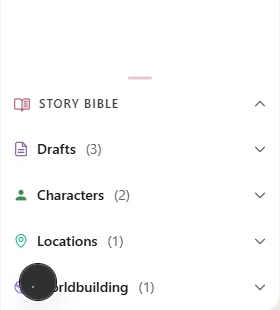
The Story Bible panel — see which entries will be injected into your next generation
Smart Matching: How It Works
When you trigger a generation, the Story Bible scores every entry in your project against the text in your current draft. Entries that score above the threshold are automatically included in the AI's context. This is called smart matching.
Scoring Signals
The Story Bible uses a relevance scoring system to determine which characters, locations, and worldbuilding entries are most relevant to your current scene. It considers factors like:
- Direct name mentions in your text
- Activation keywords you've defined
- Thematic connections to your current content
The Threshold
Only entries that score above a minimum relevance threshold are included. This ensures the AI receives focused, useful context rather than everything in your project.
Manual Overrides
While smart matching handles most cases, you have full manual control:
- Always include — force an entry to be injected into every generation, regardless of its score. Use this for characters or world rules that are always relevant to your story.
- Always exclude — prevent an entry from ever being injected. Use this for entries that contain spoilers for later chapters, or for characters who haven't been introduced yet.
- Auto (default) — let the smart matching system decide based on the scoring signals described above.
You can set overrides from the Story Bible panel in the left sidebar. Each entry shows a toggle for its inclusion mode.
Context Limits
AI models have finite context windows, so Genesis Writer enforces limits to keep everything within bounds. These limits are generous enough for most projects and are automatically managed — you don't need to worry about them. If a project has extensive worldbuilding, the system prioritizes the most relevant entries.
When a context source exceeds its limit, it's truncated intelligently — the most relevant content is kept and the rest is trimmed. The system prioritizes nodes closest to your current draft and entries with the highest match scores.
The Story Bible Panel
The Story Bible panel lives in the left sidebar of the writer interface. It gives you a real-time view of what the AI will see:
- Detected entries — entries that scored above the threshold based on your current draft text.
- Always-included entries — entries you've manually forced to always be present.
- Excluded entries — entries you've manually excluded.
- Entry types — color-coded by type (character, location, worldbuilding).
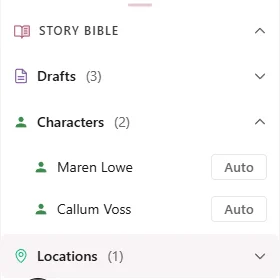
The Story Bible panel shows which entries are active for your current scene
This panel updates as you write, so you can see exactly which entries will be injected before you trigger a generation. If something important is missing, you can manually include it. If something irrelevant is cluttering the context, you can exclude it.
Tips for Better Context
The quality of your AI output is directly proportional to the quality of your context. Here are the most impactful things you can do:
Fill in your project settings
Genre, tone, themes, and logline take five minutes to set up and affect every single generation. A project with “Genre: Dark Fantasy, Tone: Atmospheric and brooding” produces fundamentally different prose than one with no settings at all. Configure these in project settings.
Create character profiles
Characters are the richest context source. Even a basic character with a name, role, and a few personality traits dramatically improves how the AI writes dialogue and interactions. Full profiles with biography, voice, and personality data take the AI to another level entirely.
Add activation keys and aliases
If a character goes by multiple names (a nickname, a title, a secret identity), add those as activation keys. The smart matching system uses these to detect when a character is relevant even if their full name isn't mentioned. For example, add “The Commander” and “Mom” as activation keys for a character named Sarah Chen.
Build your world
Locations and worldbuilding entries give the AI spatial and structural awareness. When the AI knows that the Blackwood Tavern is a dimly lit underground bar with sawdust floors and crooked mirrors, it writes scenes set there with authentic detail.
Organize your project tree
The document hierarchy determines which sibling and parent nodes contribute context. A well-organized tree — with chapters nested under parts, characters in their own folder, locations grouped by region — gives the AI a clearer picture of your story's structure. See Project Structure & Nodes.
Use writing styles
Writing styles add another layer of context: instructions about how to write. They control vocabulary, sentence rhythm, prose density, and tone. Pairing good story context with a well-matched style is the formula for consistently excellent output.
Now you understand the complete AI system in Genesis Writer — from how generation works to choosing models, managing tokens, tuning settings, and building context. For more on specific features, explore the Writer and Characters documentation.