The Token Economy
How Genesis Tokens work, what they cost, and how to manage them.
Last updated October 2026
What Are Genesis Tokens?
Genesis Tokens are the universal currency that powers everything in Genesis Writer — AI text generation, character portraits, style illustrations, and more. Instead of tracking usage across six different AI providers, each with its own pricing model, you have one unified token pool that works the same way regardless of which model you use.
Tokens Per Plan
Each subscription tier comes with a monthly token allowance. When your tokens run out, you'll need to wait for the next billing cycle or upgrade your plan.
| Plan | Price | Tokens | Reset |
|---|---|---|---|
| Free Free | Free | 25,000 | Never (one-time grant) |
| Basic Basic+ | $9.99/mo | 2,000,000 | Every 30 days |
| Writer Writer+ | $19.99/mo | 5,000,000 | Every 30 days |
| Professional Pro | $49.99/mo | 25,000,000 | Every 30 days |
Extra Tokens & Bonus Tokens
Genesis Writer gives you extra tokens in a couple of situations:
- First-time subscriber bonus — when you subscribe to any paid plan for the first time, you receive +25% extra base tokens for your first month. Every first-time subscriber gets the same bonus, whether or not you signed up through a referral link. These extra tokens are part of your base allocation and reset with your billing cycle. After the first month, you receive exactly your plan's base tokens each cycle.
- Bonus tokens (promotions only) — separate from your base allocation, bonus tokens can be awarded through admin coupons, promotions, or giveaways. These are tracked separately from your base tokens.
For example, if you subscribe to the Writer plan ($19.99/mo, 5M tokens), your first month gives you 5M + 1.25M extra = 6.25M tokens total. From month 2 onward, you receive the standard 5M base tokens.
What Costs Tokens?
Different actions cost different amounts of tokens. The cost depends on which model you use and how much output is generated.
Model Cost Tiers
Every model has a cost rating from $ to $$$$$ (1 to 5). This is a relative indicator — a $-rated model is the cheapest per token, a $$$$$-rated model is the most expensive. The actual token cost depends on how much context you send and how much text is generated, but the cost rating gives you a quick way to compare.
The ratings below are rounded to a whole number; the model selector shows half steps.
| Cost | Models |
|---|---|
| 1 | GPT-6 Luna, Claude Haiku 5.5 |
| 2 | GPT-5.4 Nano, Gemini 3.1 Flash Lite, Gemini 3.5 Flash Lite, GPT-5 Mini, Gemini 3.6 Flash, Gemini 3.7 Flash, DeepSeek V4 Pro, Kimi K2.5, Grok 4.3 |
| 3 | Claude Haiku 4.5, GPT-4.1, GPT-5.4 Mini, Claude Sonnet 5, Claude Sonnet 5.5, GPT-6 Sol, Kimi K2.6 |
| 4 | Gemini 3.1 Pro, Claude Sonnet 4.5, Claude Sonnet 4.6, GPT-5.2, GPT-5.4, Grok 4.7 |
| 5 | Claude Opus 5.5, Claude Opus 5, Claude Opus 4.8, Claude Opus 4.7, Claude Opus 4.6 |
AI Images
AI images don't use tokens. Every plan includes a monthly image allowance, and each generated image uses one, whatever its style or content:
| Plan | AI images per month |
|---|---|
| Free Free | 1 (character portraits) |
| Basic Basic+ | 15 |
| Writer Writer+ | 35 |
| Professional Pro | 100 |
Character portraits, style card illustrations, draft images and beta reader portraits all draw from the same allowance (scene images, style illustrations and beta reader portraits need a paid plan). Paid plans get a fresh allowance when their tokens reset; the Free plan resets on the 1st of each month. Unused images don't roll over, an image that fails doesn't count, and when you've used them all, image generation waits for the reset. Your profile menu shows how many you have left.
How Token Reservation Works
Genesis Writer uses a reservation system to ensure you never get charged for text you don't keep. Here's the flow:
- Reserve — when you ask Chat to write or continue, tokens are reserved (held) from your balance based on the estimated maximum output.
- Generate — the AI produces text while the reservation is active. The reservation has a brief expiry (a few minutes) as a safety net.
- Finalize — when you click Keep, the actual cost is calculated from the real input and output token counts. This is usually less than the reservation. The difference is returned to your balance.
- Cancel — if you click Discard or Stop, the entire reservation is refunded. Your balance returns to exactly what it was before.
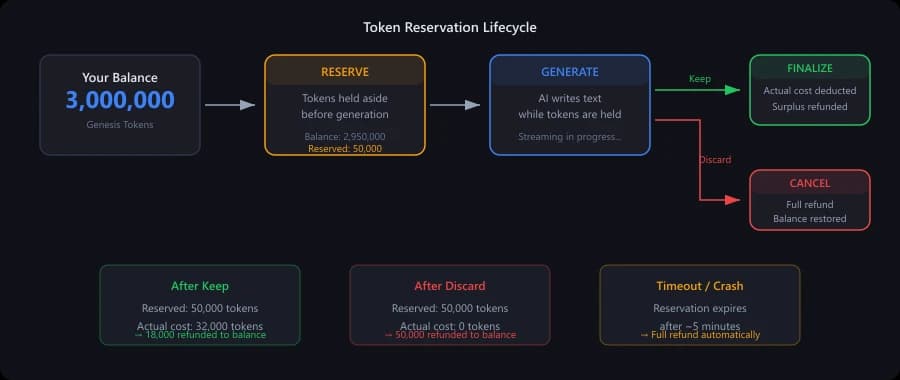
The reservation lifecycle — tokens are only spent when you click Keep
Deduction Priority
When tokens are deducted, Genesis Writer follows a specific order:
- Base tokens first — your monthly allocation (including the first-time subscriber bonus or the one-time Free-plan grant) is used before anything else.
- Bonus tokens second — promotional bonus tokens (from admin coupons, giveaways, or promotions) are only consumed after your base tokens are depleted.
Base tokens (including the first-time bonus) reset with your billing cycle. Promotional bonus tokens do not reset — they persist until used. By spending base tokens first, the system ensures your promotional bonus tokens act as a safety cushion that extends your capacity when you need it most.
Tracking Your Usage
You can monitor your token balance in several places:
- Settings page — your account settings show your current balance, usage history, and days until reset.
- Model selector — the model selector in the toolbar shows each model's cost rating ($ to $$$$$), so you can make informed choices before generating.
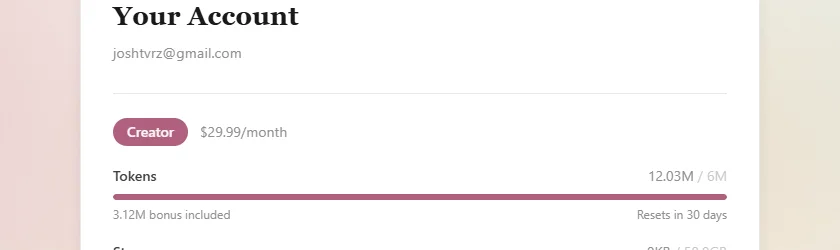
Track your token balance and usage from account settings
Low Token Warning
When your token balance drops below 20% of your plan's allocation, you'll see a warning indicator. This gives you time to either:
- Switch to cheaper models to stretch your remaining tokens further.
- Upgrade your plan for a larger monthly allocation.
- Wait for your monthly reset (paid plans refresh every 30 days).
Maximizing Your Tokens
A few practical strategies to get the most out of your token budget:
- Draft with cheap models, polish with premium ones. Use GPT-5.4 Nano or GPT-5 Mini (both near the bottom of the cost scale) for rough drafts, then switch to Claude Sonnet or Opus for your most important scenes.
- Ask Chat to continue rather than start fresh. A continuation picks up from existing text, so the AI doesn't need to “figure out” what you want from scratch. This often produces better results with fewer retries.
- Provide good context. Fill in your project settings, character profiles, and locations. Better context leads to better first-try output, which means fewer discards and retries. See Context Building & Story Bible.
- Use writing styles. A well-configured writing style tells the AI exactly how to write, reducing the chance of getting output you don't like.
- Discard freely. Discarded generations are fully refunded. There's no penalty for trying a generation and not liking the result.
Next, learn about the fine-tuning knobs available in Advanced Settings.