Character Profiles & Biography
Deep character biographies, voice analysis, and personality profiling.
Last updated October 2026
Character profiles are part of every project on every plan, including Free. Writing one costs nothing — the fields are yours to fill in, and the data only draws on your Genesis Token balance when the AI reads it during generation.
What Character Profiles Do
A character profile is more than a name and a backstory. In Genesis Writer, every character you create becomes a living dataset that the AI consults whenever it writes scenes involving that character. The richer your profile, the more consistent and authentic your character's voice, behavior, and decisions will be in generated prose.
The profile system is built on three pillars: biography, voice analysis, and personality profiling. Together, they give the AI a deep understanding of who your character is.
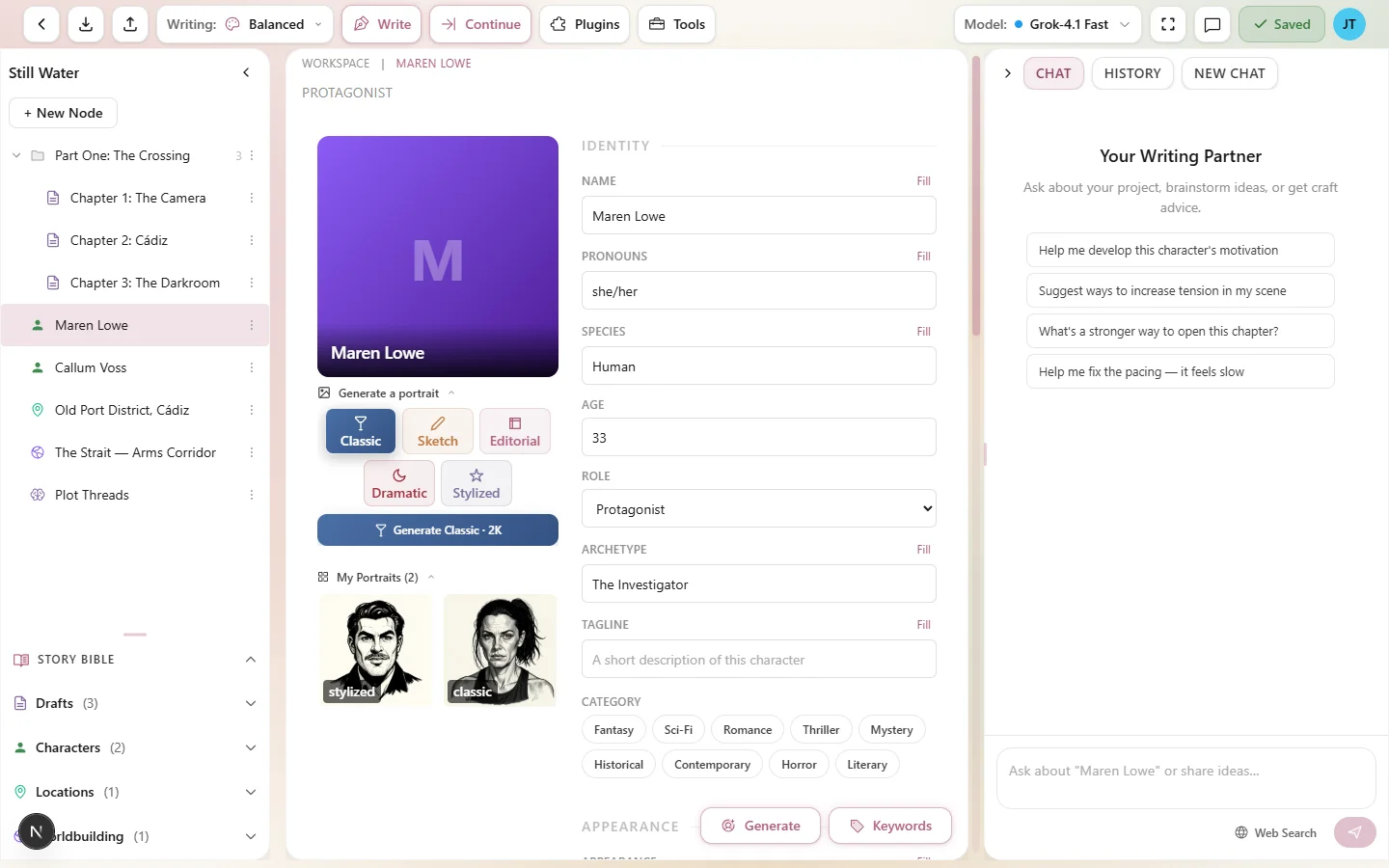
A fully developed character profile with all three data pillars
The Biography System
The biography system processes several thousand words of character data — enough for deeply detailed backstories, personality profiles, and voice descriptions. This includes everything you fill in across the character editor: name, backstory, personality, motivations, strengths, weaknesses, and role in the story.
When the AI generates prose that involves your character, it draws from this biography data to make informed decisions. If your character is described as “impulsive and fiercely loyal,” the AI will lean toward those traits in generated dialogue and action. If the backstory mentions a traumatic event, the AI may reference it subtly when writing emotionally charged scenes.
There's a generous context budget for character data. Most characters won't come close to the limit, but it's there for writers who build deeply detailed profiles for their protagonists.
Voice Analysis
Voice analysis encodes how your character speaks. The voice data on a profile captures:
- Verbal tics — habitual phrases, filler words, speech stumbles.
- Vocabulary patterns — formal vs. casual, jargon, slang, dialects.
- Sentence rhythm — short and clipped, or long and flowing.
- Speech mannerisms — do they ask questions constantly? Speak in metaphors? Avoid direct answers?
The voice data comes from the Voice & Dialogue section of the character editor: the Voice & Speech field, the Vocabulary selector (Simple, Moderate, Sophisticated, or Archaic), and any Example Dialogue lines you add. Together, they tell the AI exactly how to render this character's dialogue.
Personality Profiling
Personality profiling maps your character's traits, strengths, and flaws into structured data that the AI uses alongside biography and voice. This goes beyond a simple list of adjectives — it captures the interplay between traits, how they manifest under pressure, and which traits define the character most strongly.
Structured Traits & Intensity
Character traits in Genesis Writer use an intensity system. When you define a trait, you can mark it as high-intensity, which signals to the AI that this is a defining trait — one that should consistently show up in the character's behavior.
For example, a character might have “stubborn” as a high-intensity trait and “creative” as a regular trait. The AI will ensure stubbornness is a recurring theme in their actions and decisions, while creativity surfaces more occasionally.
This layered approach prevents flat characters. Instead of every trait getting equal weight, the intensity system creates a natural hierarchy that mirrors how real people have dominant and secondary traits.
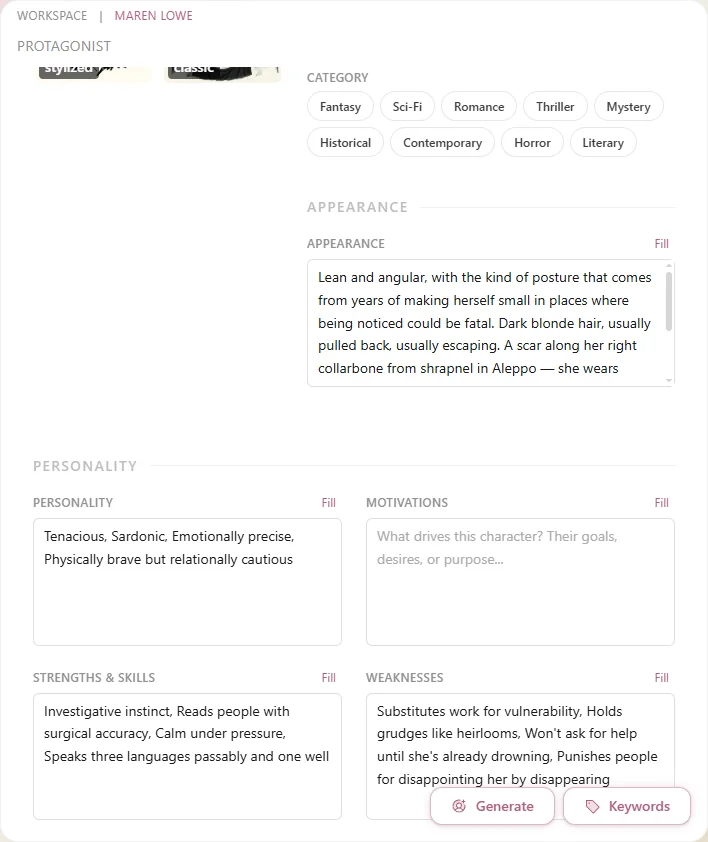
Traits with intensity levels create nuanced, realistic characters
Vocabulary Levels
The vocabulary level is a powerful but simple control that affects how the character speaks in generated prose:
| Level | Effect on Dialogue |
|---|---|
| Simple | Short words, common phrases, everyday language. Good for children, uneducated characters, or plain-spoken types. |
| Moderate | Natural conversational English. The default for most characters. |
| Sophisticated | Precise vocabulary, complex sentence structures, eloquent phrasing. Good for academics, aristocrats, or eloquent characters. |
| Archaic | Older language patterns, formal constructions, period-appropriate vocabulary. Good for historical or fantasy characters. |
How Profiles Feed AI Generation
When you ask Chat to write or continue a draft that involves a character, Genesis Writer's context builder pulls data from that character's profile and includes it in the AI prompt. This happens automatically — you don't need to reference the character manually.
The context builder prioritizes character data intelligently:
- Characters mentioned in the current scene get full biography context.
- Characters linked to the draft node get voice and personality data.
- The total character context is balanced against the overall token budget so it doesn't crowd out story context.
This means that the more you develop a character's profile, the more the AI has to work with. A character with a single-sentence backstory will get generic treatment. A character with a rich biography, defined voice, and mapped personality will come alive on the page.
Editing Your Profiles
Character profiles are fully editable at any time. Open the character from the writer's left panel and you can update any field. Changes take effect immediately — the next time the AI generates prose involving that character, it will use the updated data.
As your story evolves, update your character profiles to reflect growth, new relationships, or revealed secrets. The AI will adapt to the changes.
Next Steps
- Creating Characters — a field-by-field walkthrough of the character editor.
- Character Portraits — give your character a visual identity.
- Context Building & Story Bible — see how character data flows into the AI generation pipeline.
- Writing and Continuing with Chat — put your character to work in a scene.