AI Idea Generation
Let the AI suggest plot twists, character arcs, and story directions.
Last updated March 2026
Overview
AI idea generation is the engine behind mind-map brainstorming. Instead of staring at a blank canvas, you give the AI a topic and a category, and it generates a set of branching ideas for you to explore, refine, and build on.
The key difference from a generic chatbot is that idea generation is structured and iterative. The AI doesn't just give you a list — it creates nodes in your mind-map that you can drill into, branch from, cross-link, and eventually connect to your actual story. Every idea is a starting point, not a dead end.
How AI Generation Works
Choosing a Category
Before generating, you select a brainstorm category to focus the AI's thinking. Each category shapes the type of ideas the AI produces:
- Plot Twists generates surprises that recontextualize earlier events.
- Characters generates people with contradictions, wounds, and arcs.
- Dialogue generates conversations with subtext and distinct voices.
- Themes generates thematic tensions the story can explore.
The category also determines the craft tip that appears — a short piece of writing advice that helps you evaluate the ideas the AI generates. For example, when you select Dialogue, you'll see the reminder that “subtext is everything — what a character avoids, deflects, or talks around tells the reader more than what they say outright.”
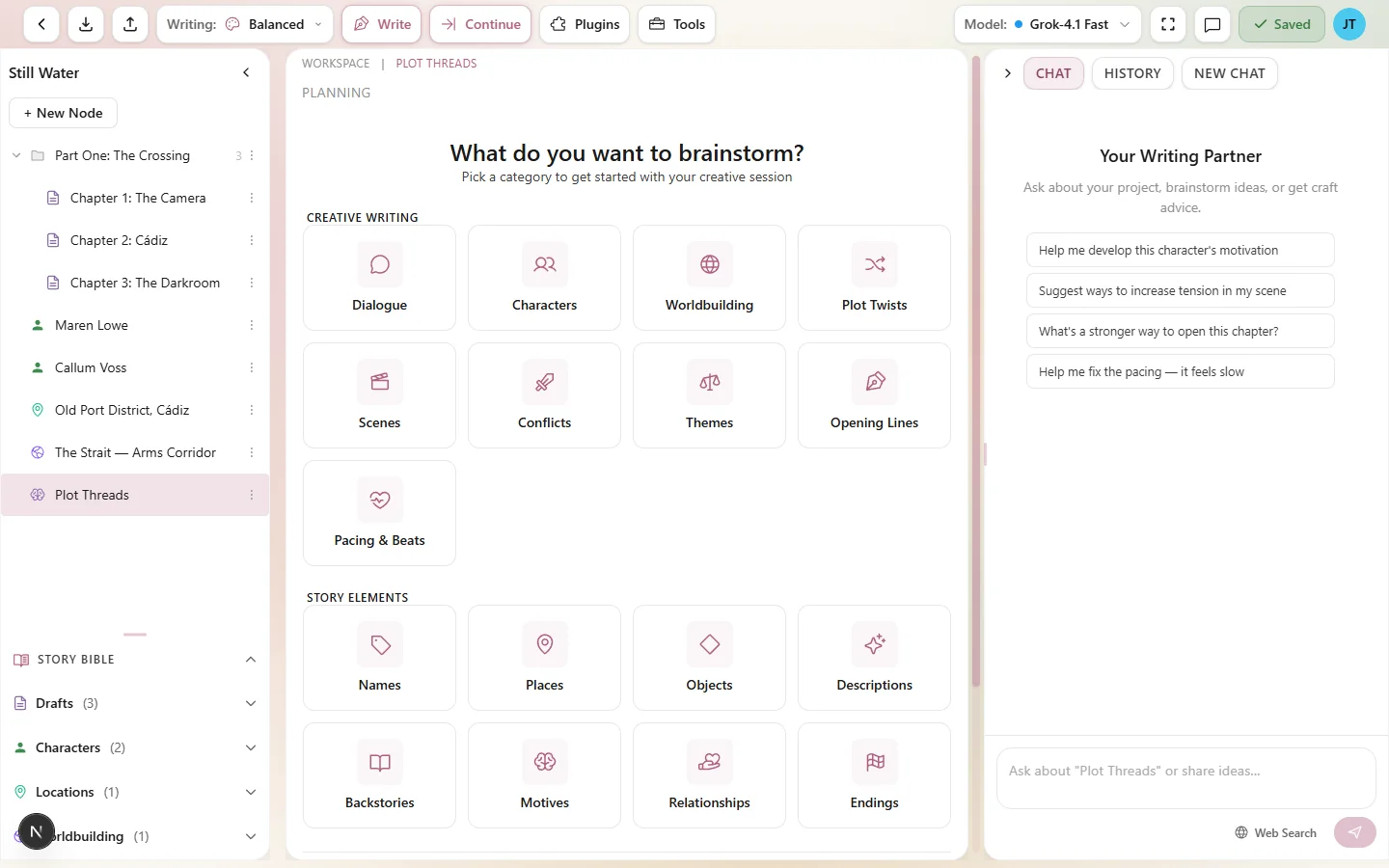
Choose a category to focus the AI's idea generation
Generating Root Ideas
With a category selected and a central topic written, click Generate to create the first wave of ideas. The AI reads your central topic, your project's genre and characters, and the selected category's specialized context to produce a set of root-level branch nodes.
These initial ideas appear as direct children of your central topic, each automatically color-coded with its own branch color. They're your starting points — broad directions that you'll narrow down and develop.
Drilling Deeper into Branches
The real power of AI brainstorming shows up when you drill deeper. Select any node on the map and generate again. This time, the AI uses that specific idea as its focus, producing child nodes that explore the concept further.
For example, if the AI generated a root idea like “The mentor is secretly the villain's sibling,” drilling deeper might produce ideas about how that secret shaped the mentor's behavior, what triggers the revelation, and how it changes the protagonist's perception of both characters.
You can keep drilling as deep as you want. Each level of depth builds on the ideas above it, creating progressively more specific and detailed concepts.
Phased Generation
AI idea generation works in phases. Each phase is a separate generation step:
- Phase 1 — Root ideas. Generate from the central topic to get your initial branches.
- Phase 2 — First drill. Pick a promising root node and generate its children.
- Phase 3+ — Deeper drilling. Continue into any child node to explore further.
Phased generation means you control the pace and direction. The AI doesn't overwhelm you with a hundred ideas at once — it gives you a manageable set at each level, and you decide where to go next.
Generation Depth Tracking
Every AI-generated node tracks its generation depth — how many levels of AI generation it took to arrive at that idea:
- Depth 0 — generated directly from the central topic. These are your broadest ideas.
- Depth 1 — generated by drilling into a depth-0 node. More specific and focused.
- Depth 2+ — increasingly refined ideas, each building on the level above.
Depth tracking lets you see how ideas evolved from the original concept. It's useful for understanding the genealogy of an idea — tracing a specific story beat back to the broad theme it grew from.
Relevance Scores
Each AI-generated node includes a relevance score — a measure of how closely the idea connects to your central topic and project context. Higher scores mean the AI considers the idea a stronger fit for your story.
Use relevance scores as a guide, not a rule. A lower-scored idea might be exactly the unexpected twist your story needs. The score reflects conventional relevance, but great fiction often comes from the unconventional.
Manual vs. AI-Generated Nodes
The mind-map clearly distinguishes between nodes you created manually and nodes the AI generated. This visual distinction helps you track which ideas are yours and which came from the AI.
Both types of nodes are first-class citizens on the canvas. You can:
- Generate AI children from a manual node (use your idea as a springboard for AI exploration).
- Manually add children to an AI-generated node (refine or redirect the AI's suggestion).
- Cross-link manual and AI nodes freely.
- Edit the text of any node, whether manual or AI-generated.
The best brainstorms mix both. Let the AI surprise you with directions you didn't consider, then add your own ideas in response.
Generation History
Every brainstorm node keeps a generation history — a timestamped log of each AI generation you've run. The history records:
- When the generation happened.
- The prompt or central topic used.
- Which nodes were created in that generation.
This makes it easy to review how your brainstorm evolved over a session. If you ran multiple generations on different branches, the history shows the order and timing of each burst.
Context Awareness
AI idea generation isn't working in a vacuum. When you generate ideas, the AI has access to:
- Your central topic — the core question or theme.
- Your project's genre — so a mystery project gets mystery-appropriate ideas.
- Character data — if the context option for including characters is enabled (it is by default), the AI knows about your project's characters and can reference them in generated ideas.
- The selected category — each category includes specialized guidance that shapes the AI's output.
- Parent node context — when drilling deeper, the AI reads the parent node's text and its ancestors.
This context awareness is why brainstorming inside Genesis Writer produces better results than brainstorming with a standalone AI tool. The AI already knows your story.
Token Cost
Each AI generation costs Genesis Tokens. The cost depends on the model you have selected and the amount of context sent. Brainstorm generations are typically lighter than full prose generation because the output is shorter — individual idea nodes rather than paragraphs of prose.
You can change your model in the toolbar before generating. Budget models work well for brainstorming since you're optimizing for volume and variety, not polished prose.
Best Practices
- Be specific in your central topic. “How does Elena's fear of abandonment affect her relationship with Marcus in Act 2?” generates far better ideas than “Act 2 ideas.”
- Use your project's genre and tone as context. The AI adapts its suggestions to fit. A horror project gets darker ideas than a romance.
- Iterate — drill into promising branches. The first generation is just the starting point. The real gold comes from going two or three levels deep into the ideas that resonate.
- Combine ideas from different branches. Draw cross-links between related concepts. The intersection of two unrelated ideas often produces the most interesting story moments.
- Don't treat every idea as precious. AI generation is cheap. Generate freely, discard ruthlessly, and keep only what serves your story. The best ideas will stand out.
- Switch categories mid-brainstorm. Start with Plot Twists to find the dramatic core, then switch to Characters to explore who's affected, then Dialogue to hear how the scene plays out. Different categories illuminate different facets of the same story problem.