Polish & Humanize
Fix grammar, improve style, and reduce AI-detectable patterns.
Last updated March 2026
Overview
Polish and Humanize are two tools for refining your prose after the initial draft is down. They both work on selected text, but they solve different problems:
- Polish fixes grammar, tightens sentence structure, and improves clarity — without changing meaning.
- Humanize makes AI-generated text sound more natural by reducing the patterns that make prose feel “machine-written.”
Both are available as selection tools in the editor and as built-in plugins.
Polish
Polish is your cleanup pass. Select a paragraph (or several) and run Polish to get a tighter, cleaner version of the same text. The AI preserves your meaning, your voice, and your intent — it just makes the writing better.
What Polish Fixes
- Grammar errors — subject-verb agreement, tense consistency, pronoun clarity
- Sentence structure — run-on sentences, fragments, awkward constructions
- Wordiness — removes unnecessary words and tightens phrasing
- Weak verbs — replaces “was walking” with “walked,” and similar improvements
- Repetition — catches repeated words and phrases in close proximity
- Clarity — untangles confusing sentences and sharpens meaning
When to Polish
- After finishing a first draft of a chapter — run Polish on each section
- Before exporting to DOCX or PDF for external review
- When you've been writing quickly and know the prose needs cleanup
- On AI-generated text that's directionally correct but rough around the edges
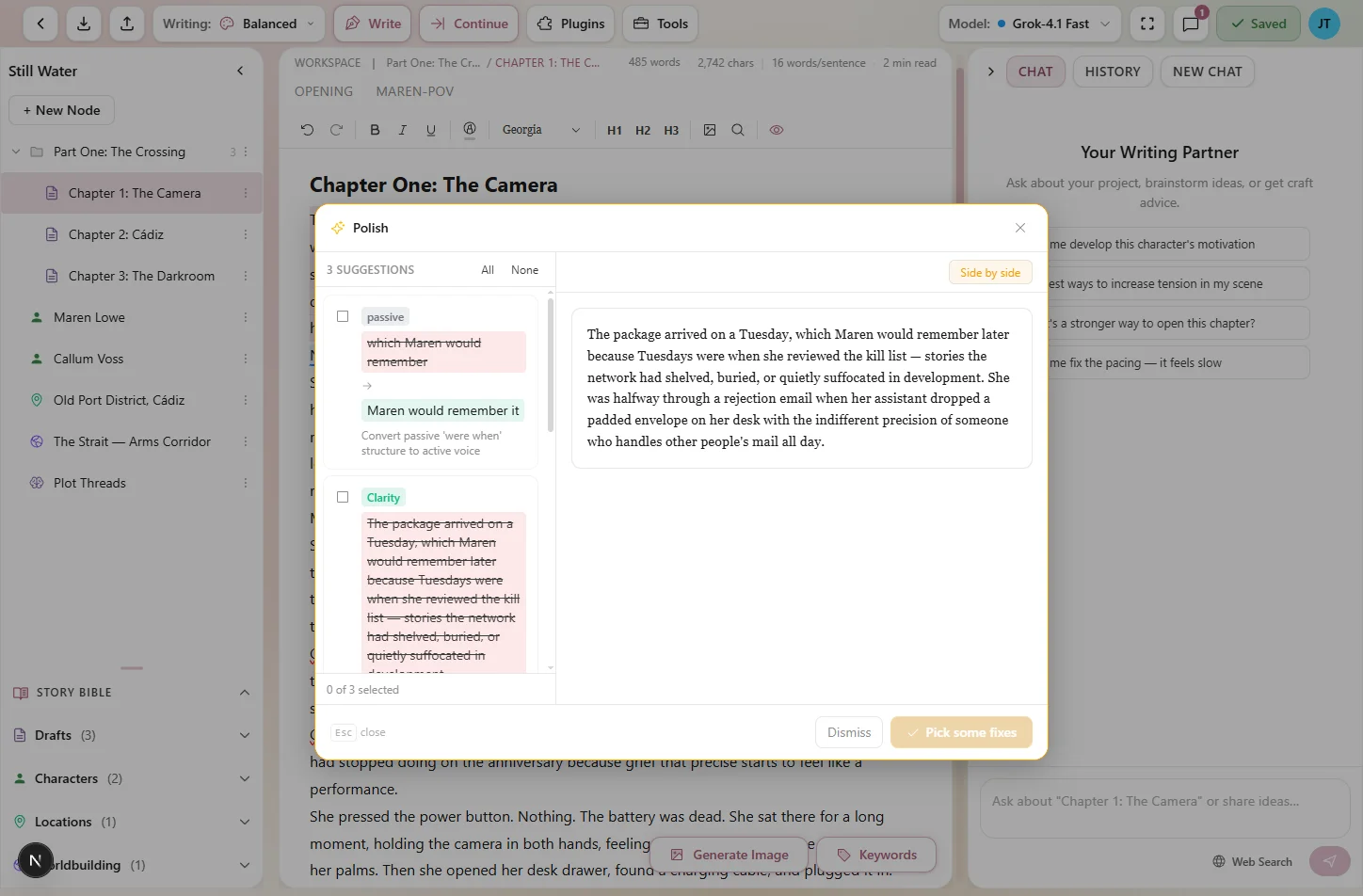
Polish tightens prose without changing your voice
Humanize
Humanize is specifically designed to reduce AI-detectable patterns in your text. AI models tend to write with certain tells — overly uniform sentence lengths, predictable word choices, formulaic transitions, and a certain “smooth” quality that experienced readers can spot.
Humanize breaks up those patterns to make the prose sound more authentically human-written.
What Humanize Changes
- Sentence length variation — mixes short, punchy sentences with longer, flowing ones
- Natural word choices — replaces overly precise or “correct” word choices with more casual, authentic alternatives
- Rhythm and cadence — introduces the kind of irregularity that human writing naturally has
- Transitions — replaces formulaic connectors (“Furthermore,” “Additionally,” “Moreover”) with more natural flow
- Micro-imperfections — adds the subtle roughness that makes writing feel lived-in rather than generated
When to Humanize
- After AI-generated text that sounds “too perfect”
- When you want AI-assisted prose that reads as authentically yours
- Before submitting work to contests, agents, or publishers
- On passages that feel robotic despite being factually correct
How to Use Them
Both Polish and Humanize follow the standard selection tool workflow:
- Select text in the editor.
- Choose Polish or Humanize from the floating toolbar or the tools panel.
- The AI generates a refined version, streaming in character by character.
- Keep to accept the changes, or Discard to restore your original text.
Tokens are handled the same way as other generation tools — reserved when the generation starts, finalized when you Keep, refunded when you Discard.
Polish vs. Grammar Checking
Genesis Writer also has a dedicated grammar checking feature. Here's how it differs from Polish:
| Feature | Polish | Grammar Checking |
|---|---|---|
| How it works | AI rewrites the text with improvements | Rule-based detection with individual suggestions |
| Scope | Grammar, style, wordiness, and clarity | Grammar and spelling only |
| Token cost | Uses Genesis Tokens | Free (no token cost) |
| Best for | Deep cleanup passes on finished sections | Catching typos and grammar errors as you write |
They complement each other well. Use grammar checking for real-time error detection, and Polish for deeper refinement when you're ready to clean up a section.
Combining with Other Tools
Polish and Humanize fit naturally into a revision workflow alongside the other selection tools:
- Draft — write freely or use Write & Continue.
- Expand — flesh out thin sections with more detail.
- Describe — add sensory richness to key scenes.
- Polish — tighten the prose and fix grammar.
- Humanize — smooth out any remaining AI patterns.
This pipeline — draft, expand, describe, polish, humanize — gives you progressively more refined prose at each step.
Tips
- Polish before Humanize. Get the grammar and structure right first, then smooth out AI patterns. Humanizing messy text produces messy results.
- Don't over-polish. Running Polish multiple times on the same text can strip away personality. One or two passes is usually enough.
- Read after Humanize. Humanize occasionally changes meaning slightly in favor of natural flow. Always read the result before keeping it.
- Use with manuscript analysis. Check your analysis scores before and after polishing to see measurable improvement.